
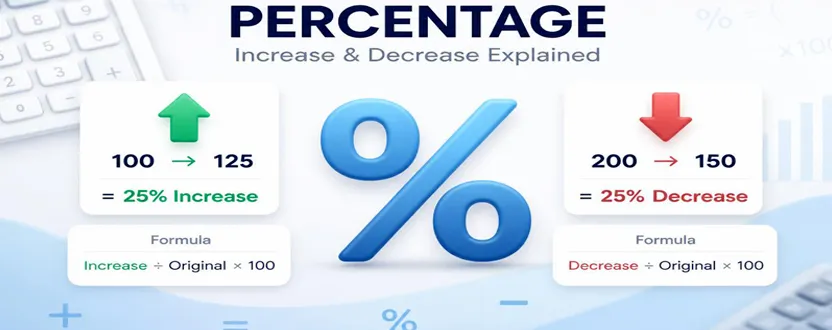
Percentage increase and decrease are useful for comparing how much a value has changed from its original amount. You can use percentage calculations to understand changes in prices, salaries, expenses, sales, website traffic, discounts, measurements, and many other everyday situations.
The basic idea is simple: first find the difference between the new value and the original value, then compare that difference with the original value.
For a percentage increase, use this formula:
Percentage Increase = (New Value − Original Value) ÷ Original Value × 100
For a percentage decrease, use:
Percentage Decrease = (Original Value − New Value) ÷ Original Value × 100
The most important point to remember is that the original value is used as the base. Using the new value instead can produce a different and incorrect percentage.
Example of Percentage Increase
Suppose a product originally costs $80 and its price increases to $100.
First, calculate the increase:
$100 − $80 = $20
Next, divide the increase by the original price:
$20 ÷ $80 = 0.25
Finally, multiply by 100:
0.25 × 100 = 25%
So, the price increased by 25%.
The same method works for salaries, sales, website visitors, savings, production numbers, or any other value that becomes larger.
Example of Percentage Decrease
Now suppose a product originally costs $200 and the price falls to $150.
First, calculate the decrease:
$200 − $150 = $50
Then divide the decrease by the original value:
$50 ÷ $200 = 0.25
Multiply by 100:
0.25 × 100 = 25%
Therefore, the price decreased by 25%.
This method is particularly useful when calculating discounts. For example, if a $200 product is reduced to $150, the discount represents a 25% decrease from the original price.
Percentage Increase vs Percentage Decrease: How to Calculate Them
Although the two calculations are very similar, the direction of the change determines which formula you should use.
For an increase:
(New − Original) ÷ Original × 100
For a decrease:
(Original − New) ÷ Original × 100
Consider a salary that rises from $40,000 to $46,000.
The increase is:
$46,000 − $40,000 = $6,000
Then:
$6,000 ÷ $40,000 × 100 = 15%
The salary increased by 15%.
Now consider a monthly expense that falls from $1,000 to $850.
The decrease is:
$1,000 − $850 = $150
Then:
$150 ÷ $1,000 × 100 = 15%
The expense decreased by 15%.
A Faster Way to Think About Percentage Change
You can also think of percentage change as:
Change ÷ Original Value × 100
The only difference is whether the change is positive or negative.
For example, if website traffic increases from 10,000 visitors to 12,000 visitors:
2,000 ÷ 10,000 × 100 = 20% increase
If traffic falls from 10,000 visitors to 8,000 visitors:
2,000 ÷ 10,000 × 100 = 20% decrease
This approach makes percentage calculations easier when you are working with reports, business data, expenses, or performance metrics.
Common Percentage Calculation Mistakes
One common mistake is using the new value instead of the original value as the denominator. Percentage increase and decrease normally compare the change against the starting value.
Another mistake is confusing a percentage decrease with the percentage difference between two numbers. These calculations can have different purposes, so always identify what you are trying to measure before choosing a formula.
It is also easy to make mistakes when working with large numbers or decimals. If you frequently calculate percentage changes, using an online calculator can save time and reduce manual errors.
Use a Percentage Increase and Decrease Calculator
If you need to calculate percentage changes regularly, an online calculator can make the process much faster.
Enter the original value and the new value, and the calculator can help you determine the percentage change without manually working through the formula.
Percentage calculations are useful in personal finance, business analysis, shopping discounts, salary comparisons, sales reports, fitness measurements, and many other situations. Once you understand that the original value is the comparison base, both percentage increases and decreases become much easier to calculate.
Quick Reference
Percentage Increase:
(New Value − Original Value) ÷ Original Value × 100
Percentage Decrease:
(Original Value − New Value) ÷ Original Value × 100
Example:
$100 → $125 = 25% increase
$200 → $150 = 25% decrease
Understanding these formulas gives you a simple way to measure changes and make sense of numbers in everyday life and business.
1. What is the formula for percentage increase?
The formula is (New Value − Original Value) ÷ Original Value × 100. The result shows how much the new value increased compared with the starting value.
2. What is the formula for percentage decrease?
The formula is (Original Value − New Value) ÷ Original Value × 100. It measures how much a value has fallen compared with its original amount.
3. Is percentage increase the same as percentage change?
Percentage increase is a type of percentage change where the new value is greater than the original value. Percentage change can describe either an increase or a decrease depending on the direction of the change.
4. How can I calculate percentage increase or decrease quickly?
You can use an online percentage increase and decrease calculator. Enter the original and new values to quickly determine the percentage change without performing the calculation manually.