
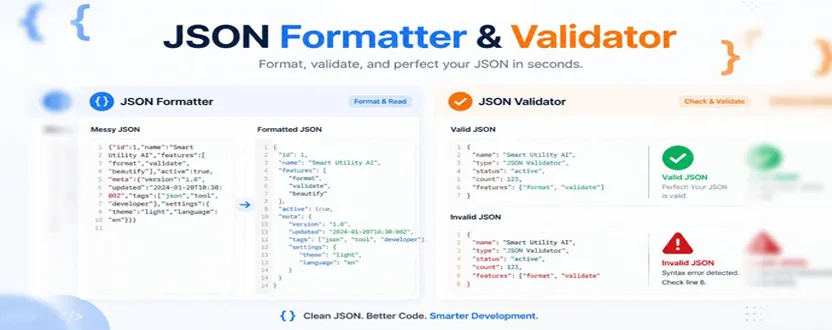
JSON is one of the most widely used data formats in web development, APIs, applications, and software projects. If you work with JSON regularly, you may have encountered two common tools: a JSON formatter and a JSON validator.
Although these tools are often available together, they solve different problems.
A JSON formatter focuses on making JSON easier to read by organizing the data with proper indentation, spacing, and line breaks. A JSON validator, on the other hand, checks whether the JSON follows the correct syntax and structure required for valid JSON.
Understanding the difference can help developers choose the right tool when working with API responses, configuration files, application data, or debugging code.
JSON Formatter vs JSON Validator: What Does Each Tool Do?
A JSON formatter, sometimes called a JSON beautifier, takes compact or difficult-to-read JSON and reorganizes it into a more readable format.
For example, compact JSON might look like this:
{“name”:”John”,”age”:30,”city”:”New York”}
A formatter can turn it into a structured version:
{
“name”: “John”,
“age”: 30,
“city”: “New York”
}
The information hasn’t changed. The formatter simply changes the presentation so that developers can understand the relationships between objects, arrays, and values more easily.
A JSON formatter is particularly useful when you receive a long API response or copied JSON that has little or no indentation.
A JSON validator performs a different job. It checks whether the JSON follows valid JSON syntax.
For example, JSON requires property names to use double quotation marks. This is valid:
{
“name”: “John”
}
But this is invalid JSON:
{
name: “John”
}
A validator can identify the syntax problem and, depending on the tool, indicate where the error occurs.
When Should You Use a JSON Formatter?
Use a formatter when your JSON is valid but difficult to read.
Common situations include:
Cleaning up API responses
Reading large JSON files
Reviewing configuration data
Debugging nested objects
Preparing JSON for documentation
Understanding arrays and objects
Making minified JSON easier to inspect
Formatting is mainly about readability and organization.
When Should You Use a JSON Validator?
Use a validator when you aren’t sure whether your JSON is syntactically correct.
A validator is useful when:
An API returns an unexpected error
A JSON file refuses to load
You receive JSON from another application
You are editing configuration files
You suspect a missing comma or quotation mark
You want to check JSON before sending it to an API
Validation is mainly about correctness.
JSON Formatter and Validator: Can You Need Both?
Yes. In many situations, using both tools together is the most efficient approach.
Imagine you receive a large JSON response containing hundreds of lines of data. It is difficult to read because everything is compressed into a single line.
You can first use a JSON formatter to organize the data.
Then, if there appears to be a syntax problem, you can use a JSON validator to check whether the JSON is actually valid.
Some online developer tools combine both functions, allowing you to format and validate JSON in the same workflow.
👉 🛠️ JSON Formatter
👉 ✅ JSON Validator
These tools can save time when working with large JSON structures instead of manually checking every bracket, comma, and quotation mark.
Common JSON Errors a Validator Can Help Find
JSON has strict syntax rules. A small mistake can make otherwise useful data invalid.
Common problems include:
Missing commas
{
“name”: “John”
“age”: 30
}
There should be a comma after “John”.
Single quotation marks
{‘name’: ‘John’}
Standard JSON uses double quotation marks instead.
Missing quotation marks around property names
{
name: “John”
}
The property should be written as “name”.
Unclosed brackets or braces
{
“name”: “John”
The closing } is missing.
A validator can help identify these types of syntax problems so you can correct them before using the JSON elsewhere.
The Simple Difference to Remember
The easiest way to remember the difference is:
JSON Formatter = Makes JSON easier to read.
JSON Validator = Checks whether JSON is valid.
A formatter doesn’t necessarily prove that your data is valid just because it looks organized. Likewise, a validator doesn’t exist primarily to make your JSON visually attractive.
If you are working with JSON frequently, both tools can be useful parts of a developer workflow.
For example:
Receive JSON → Validate → Format → Inspect → Edit → Validate Again
This workflow can make debugging and reviewing JSON much easier.
If you need to check your JSON quickly, use the appropriate Smart Utility AI developer tool rather than manually searching through a large JSON document for syntax mistakes.
1. What is the difference between a JSON formatter and a JSON validator?
A JSON formatter organizes JSON with indentation and line breaks to make it easier to read. A JSON validator checks whether the JSON follows valid syntax and identifies errors.
2. Can a JSON formatter validate JSON?
Some JSON formatting tools also perform validation automatically, but formatting and validation are different functions. A dedicated validator is useful when you specifically need to confirm that JSON syntax is correct.
3. When should I use a JSON validator?
Use a JSON validator when you receive an error from an API, edit a JSON file, work with configuration data, or suspect that your JSON contains a syntax error such as a missing comma, quotation mark, bracket, or brace.
4. Should I format or validate JSON first?
If you aren’t sure whether the JSON is valid, validate it first. Once it passes validation, format it to make the structure easier to read and inspect. If your tool combines both functions, you can perform both steps together.